Find answers to common questions about academic advising and navigating your academic journey at BRCC.
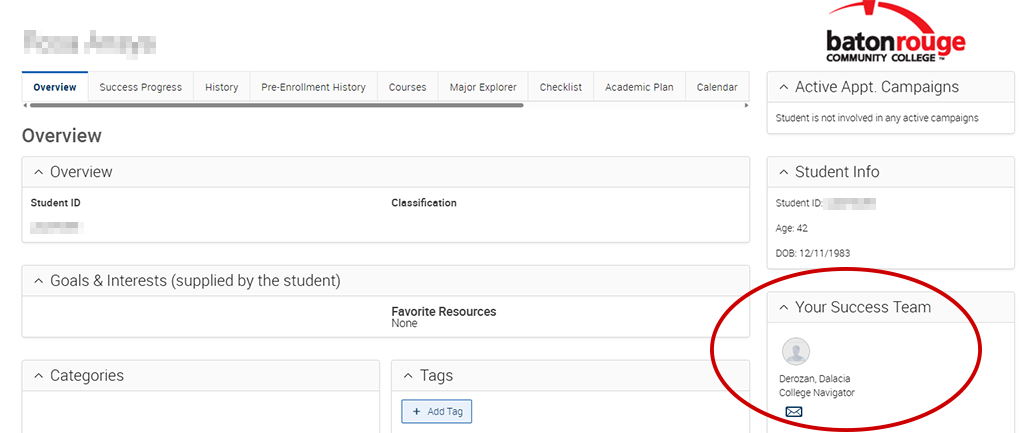
Your Navigator is your go-to guide for understanding what to do next at BRCC. They can help you navigate college processes, answer questions, connect you with campus resources, and help you find the right office when specialized support is needed. You can find the contact information for your assigned Navigator in Navigate360, or at the top of your DegreeWorks dashboard.
You should contact your Navigator anytime you're unsure about your next step. They can help if you're:
- Registering for classes
- Unsure what courses to take
- Thinking about changing your major
- Completing your application
- Trying to understand a Navigate360 alert
- Looking for campus resources
- Not sure who to ask for help
If you're wondering where to start, start with your Navigator.
You can find your assigned Navigator in Navigate360 or at the top of your DegreeWorks portal.
In Navigate360, your Navigator is displayed in the "Your Success Team" section of the portal.
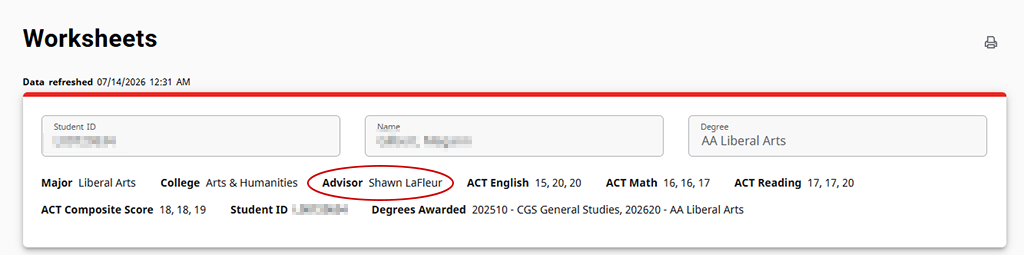
In the DegreeWorks portal, your Navigator is displayed in "Worksheets" in the "Advisor" section.
If you haven't been assigned a Navigator yet, email collegenavigators@brcc.edu.
You can find the contact information for your assigned Navigator in Navigate360, or at the top of your DegreeWorks dashboard.
Reserve in-person or virtual appointment with a College Navigator
Walk-in appointments are also available:
Monday through Friday
8:00 a.m. to 5:00 p.m.
Mid City, Port Allen, and Acadian campuses.
Yes. Your Navigator can help you understand the registration process, review your degree plan, explain registration requirements, and answer questions about your next steps.
If another office or approval is needed, they'll help you understand what to do next and connect you with the appropriate resource.
Your Navigator can help answer general financial aid questions, like what aid will cover, how to read your award, and if you have been awarded. If you have specific questions, you can connect with a financial aid counselor today.
Your Navigator will listen to your questions, help you create a plan, explain your next steps, and connect you with other offices if needed.
They may also send reminders through Navigate360 and follow up to help you stay on track.
Your Navigator may not be the office that makes the final decision, but they know who can.
They'll help you understand what comes next, explain the process, and connect you with the right office so you don't have to figure it out on your own.
To ensure course placement leads to academic success, BRCC has defined prerequisites for courses that will be taken in pursuit of a degree. Prerequisites are defined as minimum required scores on standardized tests or successful completion of a related course. Course prerequisites can be found on the online course schedule or through DegreeWorks.
For permission to register into a course where the course prerequisites were met at a prior institution, log in to LoLA with your Baton Rouge CC credentials and complete the Prerequisite Override Request Form under academic links or submit your official transcript(s) to the Registrar’s Office.
There are several ways to determine your Math and English placement. Depending on your academic history, you may qualify through:
- Placement Testing
- Self-Directed Placement Surveys
- Previous college credit from another institution
For more information, visit the Testing Center website's Placement Guide for English and Math.